

PLEASE NOTE: Effective 2019, we no longer supply Control Techniques variable frequency drives and components. We have drives from several other manufacturers which can meet or exceed the performance characteristics of the Control Techniques line. Simply complete the form below, or contact us with the model of your current or obsolete Control Techniques drive and we’ll be glad to identify a suitable replacement.
Also, the Fincor and Saftronics lines of AC variable frequency drives, DC variable speed drives, and reduced voltage starters were once owned by Emerson but have been obsolete for several years. However, we have many years’ experience working with these drives and can quickly identify replacements capable of exceeding the quality and performance of these older drive technologies. For a suitable replacement, fill out the form below or contact us with your drive or application requirements, and we’ll handle it from there!
Commander SX |  |
NEMA 4X Washdown Drive |
- Overview / Typical Applications
- Features, Ratings, Prices & Ordering
- Terminal Diagram and Description
- Specifications and Dimensions
- Options – Overview / Drive Configuration and Programming
- Communication / Operator Interface
- Power Accessories
- Input / Output & Communication
COMMUNICATION CABLE
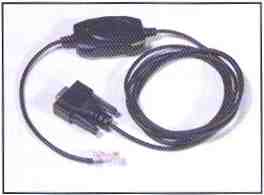 Using a special RS232 to RS485 converter you can connect th PC to the RJ45 serial port on the front of the drive. A special pre-made cable is available from Control Techniques for this purpose – the same cable is used with other Control Techniques products that use a RJ45 RS485 connector such as the Unidrive SP and Commander SK.
| Description | Order Code |
| PC-to-drive Comms Cable | CT Comms Cable |
XPRESSKEY
 The XPressKey option is used to save a copy of all the Commander SX parameters so that they can be duplicated very simply into another drive. To Save parameters using the XPressKey:
- Connect the XPressKey to the Commander SX serial port
- With the drive disabled “Inh”, set Pr 64 to “Prog”
- Confirm the transfer of parameters into XPressKey by pressing the drive “Stop” key
To set the drive parameters with the XPressKey:
- Connect the XPressKey to the serial port
- With the drive disabled “Inh”, press the “Key” button once
- Confirm the transfer of parameters into the drive by pressing the” Key” button a second time
- When the display reverts back to “Inh”, the transfer is complete and the XPressKey can be disconnected and replaced in its storage slot
| Description | Order Code |
| SX cloning module | XPRESSKEY |
Information provided by Control Techniques, a world leader in the design, production and marketing of electronic drives for the control of electric motors.
Operator Interfaces
 LOCAL CONTROLS VIA PUSHBUTTON (PB)
 LOCAL CONTROLS VIA PUSHBUTTON (PB)
Commander SX is supplied standard with a LED display comprising 4 x 7 segment digits to indicate drive status and operating data, Programming is done via intuitive operator panel with 3 control buttons and three parameter setting buttons, All parameters are in a simple menu structure and programming is done in a simple and easy way just like Commander SK.
PX-LCD
This handheld NEMA 12 option makes it much easier to set the Commander SX parameters and access them, Its LCD display, consisting of one line of 12 characters and 2 lines of 16 characters, offers text which can be displayed in 5 languages (English, French, German, Italian and Spanish).
 | The PX-LCD console has 4 main functions:
|
| |
| Description | Order Code |
| LCD Handheld Keypad | PX-LCD |
Information provided by Control Techniques, a world leader in the design, production and marketing of electronic drives for the control of electric motors.